



With global regulations such as the Americans with Disabilities Act (ADA) in the U.S. and the European Accessibility Act (EAA), higher education institutions must ensure that all course materials are accessible to every student.
However, the reality on the ground is complex. Faculty often lack the tools or knowledge to make materials accessible, while accessibility offices face the daunting task of supporting thousands of files across departments. The result is a growing operational burden, compliance risk, and barriers to student success.
To address these challenges, Leganto now includes a set of new capabilities that embed accessibility into everyday workflows.
1. Request Accessible Files with Ease
Faculty and staff can now initiate a dedicated workflow to request accessible versions of course materials. When enabled, Leganto now includes a request form where users can request an accessible file for items on Leganto lists. They can add a comment describing their accessibility needs, and users can also choose to include additional email recipients in case the requester is asking on behalf of another user. When enabling the feature, the library configures email addresses where the request will be sent. The email address may be affiliated with staff outside the library as the rest of the workflow is handled outside of Alma/Leganto.
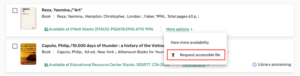
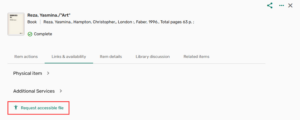
This ensures users can easily get the support they need.
2. Track Accessibility Status
Visibility is key to scaling accessibility efforts. It is now possible to use Leganto to assign an accessibility status to files. Accessibility information can be set during file upload or updated later when editing an item. The information is intended for internal library use only and is not displayed to students. This enhancement helps institutions better track and manage the accessibility of files used in courses.
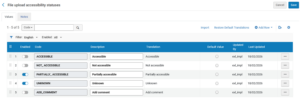
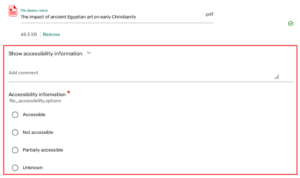
This empowers both instructors and library teams to stay aligned and proactive.
3. Upload Multiple File Formats per Item
Leganto now allows multiple file formats to be uploaded and managed under a single item. When enabled, it is now possible to upload multiple file formats per citation. This update enables institutions to support different accessibility needs without creating duplicate items in their lists. Note that the copyright is still managed at the item level, not per file. All uploaded formats are displayed in the full view, but only the default item displays on the list view to discourage instructors from uploading distinct content per file.
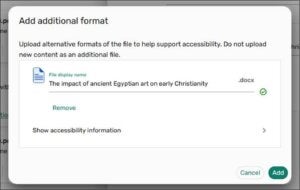
This makes it easier to provide alternative formats (e.g., PDF, EPUB, accessible versions) without duplicating content.
4. Add Alternative Text When Uploading Images to Lists
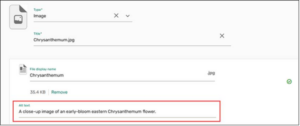
Leganto users can now add alternative text to images. This enhancement improves accessibility by enabling image descriptions (alternative text) for users who are blind or have low vision.
When uploading an image or editing an existing item that contains an image, users can enter alternative text that explains the image’s content or purpose in the Alt text field. Adding alternative text is optional and does not require configuration. This small but critical enhancement helps ensure that visual content is accessible to all learners.
Together, these capabilities help institutions:
- Reduce operational burden by streamlining workflows
- Improve compliance readiness with better tracking and processes
- Enhance student equity and success by removing barriers to access
- Empower faculty and staff with practical, embedded tools
The Leganto team have been focused on making the platform itself accessible. Now, we’re taking the next step: helping institutions manage and scale accessibility of the course materials themselves.
Additional accessibility enhancements are already on the roadmap, continuing our commitment to helping institutions meet evolving requirements and scale their efforts effectively.
Stay tuned for the full release notes and upcoming innovations.